Last Updated on June 8, 2026 by CU Staff
VeePN is one of those VPNs that shows up everywhere with a tempting price tag and a long list of features. The promise sounds great: military-grade encryption, thousands of servers, antivirus thrown in, and a price that drops to a couple of dollars a month if you commit long term. But cheap VPNs have a habit of disappointing where it counts, so the real question is whether VeePN delivers or just looks good on paper.
I spent time digging through VeePN’s current setup, cross-checking it against hands-on testing from several independent review labs, and weighing the good against the genuinely frustrating. Here is the short version before we go deep.
Quick summary: VeePN is a Panama-based VPN that packs an impressive feature set into a low-cost package. It runs around 2,500 to 2,600 servers, supports modern protocols including WireGuard, allows torrenting on every server, and bundles extras like an ad blocker and antivirus. Where it stumbles is consistency. Streaming is hit-or-miss, speeds drop noticeably on distant servers, the privacy policy has raised eyebrows, and customer support can be slow. It is a solid pick for everyday privacy on a budget, but it is not a streaming or speed champion.
Who VeePN is best for: Budget-conscious users who want strong encryption and decent privacy for daily browsing, torrenting, and basic geo-unblocking. Families also benefit, since the higher tiers cover up to 20 devices.
Who should avoid it: Heavy streamers who need rock-solid Netflix and BBC iPlayer access, people who want the fastest possible speeds, and privacy purists who demand a fully audited, transparent no-logs record.
Overall rating: 3.8 out of 5. Good value, real strengths, but some rough edges that keep it out of the top tier.
If you are still learning the basics of online privacy and access, our guide on how to access blocked or bypass blocked websites pairs well with this review and explains why a VPN matters in the first place.
VeePN at a glance
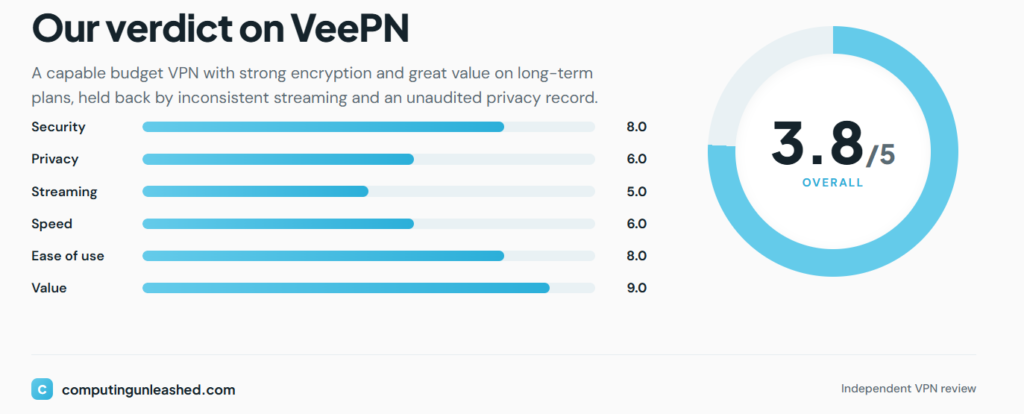
Here is the core spec sheet so you can size it up fast.
| Feature | VeePN |
|---|---|
| Starting price | Around $1.99 to $2.49 per month on long-term plans |
| Monthly price | $10.99 to $14.99 depending on tier |
| Server count | About 2,500 to 2,600 |
| Countries | Roughly 60 (the company markets up to 85) |
| Device support | Windows, macOS, Linux, Android, iOS, smart TVs, consoles, routers, browser extensions |
| Simultaneous connections | 5 (Basic), 10 (Pro), up to 20 (Max) |
| Money-back guarantee | 14 days on monthly, 30 days on 6-month and longer plans |
| Streaming support | Partial. Works for some services, blocked on others |
| Torrenting support | Yes, on all servers |
| Encryption | AES-256 |
| Protocols | WireGuard, OpenVPN, IKEv2 |
| Jurisdiction | Panama |
| Logging policy | No-logs (claimed; transparency concerns exist) |
A quick note on the server and country numbers: VeePN’s own site advertises 2,600 servers in 85 countries, but most independent reviewers count closer to 2,500 servers across about 60 countries. The gap probably comes from how locations and city-level servers are counted. I lean toward the more conservative independent figure when judging coverage.
What is VeePN?
VeePN is a virtual private network service headquartered in Panama. For anyone new to this, a VPN is a tool that encrypts your internet traffic and routes it through a remote server, hiding your real IP address and making it much harder for your internet provider, advertisers, or snoops on public Wi-Fi to see what you are doing online.
VeePN is a relatively young player in a crowded market dominated by names like NordVPN, ExpressVPN, and Surfshark. Rather than competing on brand recognition, it leans hard into two things: price and feature volume. The pitch is essentially “everything the big names offer, for a fraction of the cost.” Over the years it has expanded beyond a basic VPN into a wider security suite, adding a built-in antivirus, data breach alerts, and an “Alternative ID” feature for creating throwaway identities.
The Panama base matters for privacy. Panama sits outside the 5/9/14 Eyes intelligence-sharing alliances, which means there is no legal framework forcing the company to hand user data to those governments. That is a genuine plus, though as we will see, jurisdiction alone does not guarantee privacy.
VeePN features
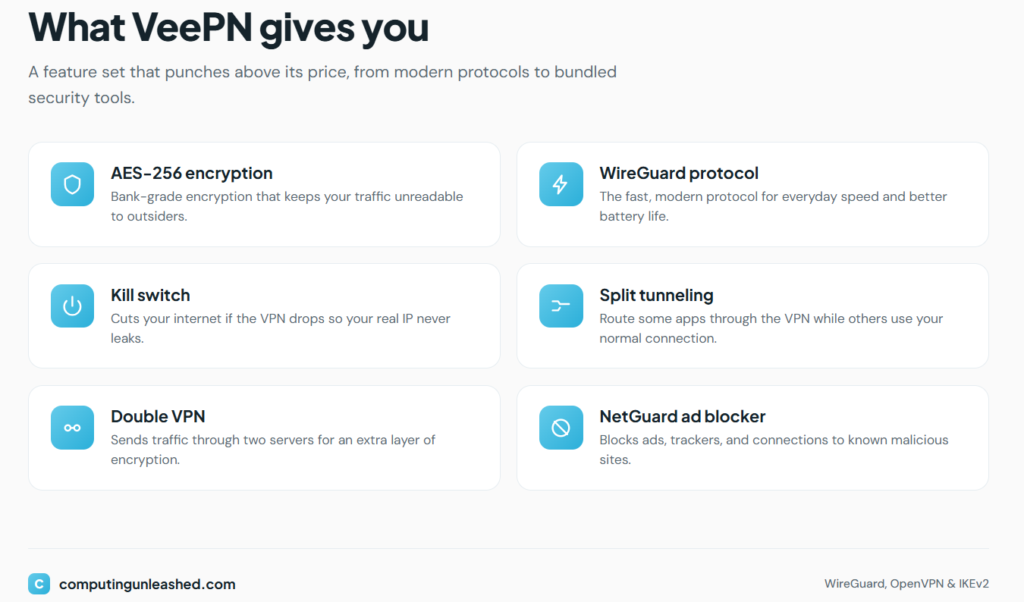
VeePN’s feature list is one of its biggest selling points. Here is what each major feature does and why you might care.
AES-256 encryption
This is the encryption standard used by banks, governments, and basically every reputable VPN. It scrambles your data so thoroughly that breaking it by brute force is not realistically possible with current technology. VeePN uses it across its apps, and there is nothing to complain about here. It is the baseline you should expect, and VeePN meets it.
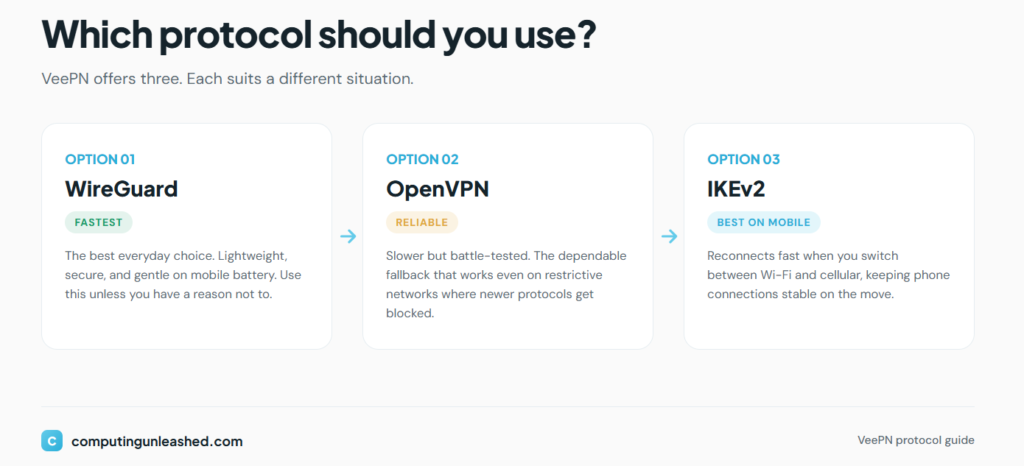
WireGuard protocol
WireGuard is the modern protocol most people should use. It is fast, lightweight, and secure, and it has largely replaced older options for everyday connections. Having WireGuard support is important because it directly affects your speed and battery life on mobile. Some older reviews noted VeePN only offered OpenVPN and IKEv2, but the current apps include WireGuard, which is a meaningful upgrade.
OpenVPN
OpenVPN is the long-trusted workhorse protocol. It is slower than WireGuard but extremely reliable and battle-tested, and it works well in restrictive networks where newer protocols sometimes get blocked. It is good to have as a fallback.
IKEv2
IKEv2 is particularly useful on mobile because it reconnects quickly when you switch between Wi-Fi and cellular data. If you are on your phone a lot, this is the protocol that keeps your connection stable as you move around.
Kill switch
A kill switch cuts your internet entirely if the VPN connection drops, so your real IP never leaks during a hiccup. VeePN includes one on desktop, which is exactly when you want it. Worth flagging: some reviews have noted the iOS app historically lacked a proper kill switch, which is a common limitation across the VPN industry due to Apple’s restrictions. If you rely on iPhone for sensitive activity, check the current app behavior before trusting it fully.
Split tunneling
Split tunneling lets you route some apps through the VPN while others use your regular connection. For example, you might send your torrent client through the VPN while letting your banking app connect normally to avoid security flags. VeePN supports this, which adds real day-to-day flexibility.
Double VPN
Double VPN sends your traffic through two servers instead of one, encrypting it twice. It is overkill for most people but valuable for journalists, activists, or anyone in a high-risk situation. VeePN offers double VPN, though its selection of double-hop locations is limited compared to competitors that let you pick any entry and exit point.
NetGuard
NetGuard is VeePN’s built-in ad and tracker blocker. It strips out ads, blocks tracking scripts, and stops connections to known malicious sites. In testing by independent reviewers, it removed the majority of ads, though it was not flawless. It is a nice bonus that improves browsing and adds a small security layer, but it is not a replacement for a dedicated blocker.
DNS leak protection
DNS leaks happen when your DNS requests escape the VPN tunnel and reveal which sites you are visiting, even though the rest of your traffic is encrypted. VeePN includes leak protection, and independent testing has generally found it to hold up. This is essential, and VeePN handles it.
Multi-platform support
This is one of VeePN’s quiet strengths. It has apps for Windows, macOS, Linux, Android, and iOS, plus support for smart TVs, gaming consoles, and Wi-Fi routers. There are also browser extensions for Chrome and Firefox, though those function as proxies rather than full VPN connections, so they protect only your browser, not your whole device. Setting up a VPN on a router can protect every device in your home, which connects nicely to securing your network. If you ever wonder who else might be sharing your connection, our guide on how to check who is accessing your wireless connection is a useful companion read.
VeePN security and privacy
This is where the picture gets more complicated, and where you should pay attention.
Logging policy
VeePN advertises a strict no-logs policy and says it does not store identifiable information about what you do online. On paper, that is the right answer. The catch is that “no-logs” claims carry the most weight when backed by an independent audit, and VeePN’s transparency record here is thinner than the top-tier providers. Some reviewers have described its privacy policy as vague, which is not a great sign when privacy is the entire point of the product.
Jurisdiction
Panama is genuinely good news. It is outside the major surveillance alliances and has no mandatory data retention laws that would force VeePN to log and store user activity. This is one of the stronger parts of VeePN’s privacy story.
Data collection practices
The concern that comes up repeatedly is the gap between marketing and execution. App trackers have reportedly been discovered in certain versions of VeePN’s software, and the privacy policy language has been criticized as unclear. None of this proves wrongdoing, but it does mean you are taking VeePN somewhat at its word rather than relying on verified, audited proof.
Security architecture
On the technical side, VeePN does several things right. It uses RAM-only servers in parts of its network, which means data is wiped on every reboot and nothing is written to a permanent disk. It also supports perfect forward secrecy, which generates fresh encryption keys regularly so that even if one key were compromised, past sessions would stay protected. These are features you usually find on more expensive services.
Can you trust VeePN?
Here is my honest take. VeePN’s bones are good. The encryption is strong, the jurisdiction is friendly, and the security architecture is more advanced than the price suggests. But trust in a VPN is built on transparency and independent verification, and that is exactly where VeePN is weakest. The reported app trackers and the vague policy language mean I would trust VeePN for everyday privacy, hiding your traffic from your ISP, securing public Wi-Fi, and bypassing basic blocks, but I would hesitate to recommend it for genuinely high-stakes anonymity where your safety depends on the no-logs claim being airtight. For that, an audited provider is the safer choice.
VeePN speed test results
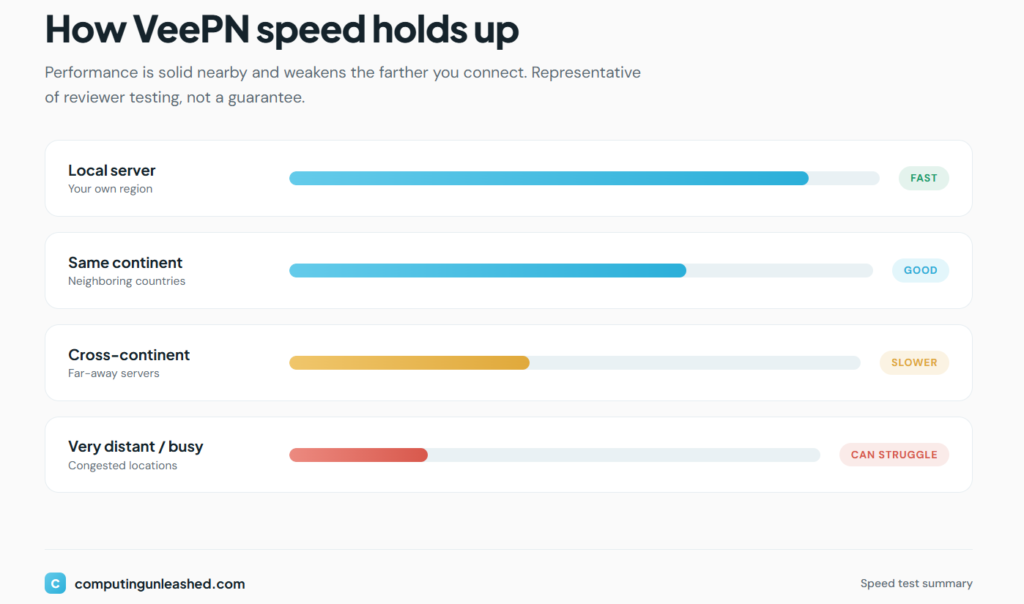
Speed is where VeePN’s budget nature starts to show. Based on independent testing, here is a realistic picture. Note that these are representative ranges drawn from reviewer testing rather than figures from a single controlled session, so treat them as a guide to behavior, not exact guarantees.
Local speed test
On nearby servers, VeePN performs reasonably well. Connecting to a server in your own region or a neighboring country usually keeps speeds high enough for HD streaming, video calls, and large downloads without obvious frustration. WireGuard helps a lot here.
| Connection | Typical result |
|---|---|
| No VPN (baseline) | Full line speed |
| Local server | Minor drop, generally usable |
| Same-continent server | Moderate drop, still workable |
International speed test
This is where things get rocky. Connecting to distant servers, say from North America to Asia, produces noticeable slowdowns that several reviewers flagged as a real weakness. If you frequently need to connect across the world, VeePN may test your patience.
| Connection | Typical result |
|---|---|
| Distant server (cross-continent) | Significant slowdown |
| Very distant or congested server | Browsing and streaming can struggle |
Streaming performance
Speed for streaming depends heavily on which server you pick and which service you are trying to reach. On a good streaming-optimized server, HD playback is achievable. On a poorly chosen or congested one, you will hit buffering. The inconsistency is the theme.
Gaming performance
For gaming, latency matters more than raw speed. On a nearby server, VeePN’s ping is acceptable for casual online play. For competitive gaming where every millisecond counts, a VPN almost always adds enough latency to matter, and VeePN is no exception. If gaming performance is your priority, our piece on whether upload speed affects online gaming explains the connection factors that actually move the needle.
Streaming performance
Streaming is the single most requested VPN use case, and it is also where VeePN is most unpredictable. Different reviewers using different servers at different times reported genuinely different results, which tells you the experience is inconsistent rather than reliably good or reliably bad.
- Netflix: Mixed. Some testers unblocked US Netflix successfully, while others found Netflix had detected and blocked VeePN’s servers, forcing them to hop between servers to find one that worked. Expect to do some trial and error.
- Disney+: Generally workable, though as with Netflix, you may need to test a few servers.
- Hulu: Inconsistent, with success depending on the specific server.
- BBC iPlayer: A common failure point. Several reviewers could not reliably unblock iPlayer, which is notoriously aggressive at detecting VPNs.
- Amazon Prime Video: VeePN lists dedicated servers for it, with mixed real-world results.
The honest summary: VeePN can stream, but it is not a set-and-forget streaming machine. If unblocking a specific service reliably is your main reason for buying a VPN, a provider with a stronger streaming track record will frustrate you less. VeePN works best for streaming as a bonus rather than the headline feature.
Torrenting and P2P support
This is one of VeePN’s clearer strengths. Torrenting and P2P traffic are allowed on every server, not just a handful of dedicated ones, which is convenient.
- Torrent friendliness: Full support across the network. You do not need to hunt for a special P2P server.
- Kill switch effectiveness: The desktop kill switch protects your real IP if the connection drops mid-download, which is exactly what torrenters need.
- Privacy considerations: The Panama jurisdiction and claimed no-logs policy make VeePN reasonable for torrenting privacy, with the same caveat about unverified logging claims.
- Download performance: On nearby servers, download speeds for torrents were solid in testing, with at least one reviewer noting faster torrent speeds than expected. On distant servers, expect the same slowdowns that affect everything else.
For everyday torrenting on a budget, VeePN holds up well.
Apps and user experience
VeePN’s apps are generally clean and beginner-friendly, which matters if you are new to VPNs.
Windows
The Windows app is the most full-featured, with all settings clearly laid out, the kill switch, split tunneling, and protocol selection. It is straightforward to navigate.
macOS
The Mac app mirrors the Windows experience with a clean, clearly labeled interface. It recommends an optimal location on launch and organizes settings in a sidebar. Testers found it pleasant to use.
Android
The Android app is solid and includes the core features most mobile users want, plus the convenience of WireGuard for better battery life.
iPhone and iPad
The iOS app is functional but has historically been the most limited, with the kill switch being the main sticking point due to Apple’s platform restrictions. It is fine for basic protection but check current capabilities if you need advanced features.
Browser extensions
The Chrome and Firefox extensions are quick to use and offer a handful of free locations, but remember they are proxies. They only protect browser traffic, not your entire device. Treat them as a lightweight convenience, not full protection.
Overall, ease of use is a point in VeePN’s favor. The apps do not overwhelm beginners, and the automatic location recommendation lowers the barrier for first-timers.
VeePN pricing
Pricing is VeePN’s headline strength and the main reason people consider it. The structure now uses three tiers: Basic, Pro, and Max, each available on monthly, yearly, or multi-year terms.
| Plan term | Approximate price | Notes |
|---|---|---|
| Monthly (Basic) | Around $10.99 to $14.99/mo | Most expensive way to pay; 14-day guarantee |
| 1-year | Around $5.83/mo, billed yearly | Roughly 47% savings; 30-day guarantee |
| Multi-year (long term) | As low as $1.67 to $2.49/mo | Best value; often billed as a single upfront payment |
The tier differences come down to features and device limits:
- Basic: The core VPN, ad blocker, and Alternative ID. Up to 5 devices.
- Pro: Everything in Basic plus antivirus and breach alerts. Up to 10 devices.
- Max: Everything in Pro plus anonymous email. Up to 20 devices.
Value for money
On the long-term plans, VeePN is genuinely one of the cheapest full-featured VPNs available, and the bundled antivirus on Pro and Max sweetens the deal. The monthly plans, by contrast, are not cheap at all, so paying month to month largely defeats the purpose of choosing VeePN. The savings live entirely in the long commitment.
Refund policy
This is a detail that trips people up. The money-back guarantee depends on your plan: monthly and 1-week plans get 14 days, while 6-month and longer subscriptions get 30 days. So the cheaper long-term plans actually come with the more generous refund window. One thing to know going in: reviewers have described the refund process as slower than ideal, sometimes requiring back-and-forth with support before approval. There is also a discounted short trial on mobile in some regions, but trial fees are typically non-refundable.
Customer support
Customer support is one of VeePN’s weaker areas, and it comes up consistently across reviews.
- Live chat: VeePN offers live chat, but multiple reviewers noted it is not truly instant. You may wait, and in some cases the agent has to consult a team before resolving your issue rather than handling it on the spot.
- Email support: Available, but expect a wait rather than a quick turnaround.
- Knowledge base: There is a fairly extensive library of help articles, which is genuinely useful, though some reviewers found it hard to navigate to the right one.
- Response time: Slower than the premium competition. If responsive support is a deal-breaker for you, this is worth weighing.
If you mostly solve your own tech problems and rarely contact support, this matters less. If you want hand-holding, VeePN may disappoint.
Pros and cons
| Pros | Cons |
|---|---|
| Very cheap on long-term plans | Monthly plans are expensive |
| Strong AES-256 encryption | Streaming is inconsistent, BBC iPlayer often fails |
| WireGuard, OpenVPN, and IKEv2 support | Noticeable slowdowns on distant servers |
| Torrenting allowed on all servers | Privacy policy criticized as vague |
| Privacy-friendly Panama jurisdiction | Reported app trackers in some versions |
| RAM-only servers and perfect forward secrecy | No independent audit publicized |
| Up to 20 devices on the Max plan | Slow customer support |
| Bundled ad blocker and antivirus | Refund process can be slow |
| Clean, beginner-friendly apps | iOS app historically limited |
VeePN vs NordVPN
NordVPN is widely regarded as one of the strongest all-around VPNs, so this is VeePN’s tough matchup.
| Feature | VeePN | NordVPN |
|---|---|---|
| Server count | ~2,500 to 2,600 | Much larger network |
| Streaming reliability | Inconsistent | Strong and reliable |
| Speed | Good locally, weak long-distance | Consistently fast |
| Independent audits | Not publicized | Audited multiple times |
| Long-term price | Cheaper | More expensive |
| Devices | Up to 20 (Max) | Multiple, generous |
| Monthly price | $10.99+ | $12.99 |
Who should choose which: Pick NordVPN if reliable streaming, top speeds, and proven, audited privacy matter most, and you are willing to pay more for them. Pick VeePN if your budget is tight and you want strong everyday encryption and torrenting without the premium price. NordVPN is the better VPN overall; VeePN is the better value.
VeePN vs Surfshark
Surfshark is interesting because, like VeePN, it positions itself as an affordable option, but it has earned a stronger reputation.
| Feature | VeePN | Surfshark |
|---|---|---|
| Simultaneous connections | Up to 20 (Max) | Unlimited |
| Double VPN flexibility | Limited locations | Flexible MultiHop, choose entry and exit |
| Streaming reliability | Inconsistent | Generally strong |
| Audits | Not publicized | Audited |
| Long-term price | Very low | Competitive, slightly higher |
| Bundled extras | Antivirus, breach alerts | Antivirus, alerts, search tools |
Strengths and weaknesses: Surfshark’s unlimited device connections and more flexible double-VPN setup give it an edge for households and power users, plus its streaming and audit story is stronger. VeePN can undercut it on the cheapest long-term plans and matches it on raw feature count. If the price difference is small, Surfshark is the safer pick. If VeePN’s lowest tier is meaningfully cheaper and you mainly need everyday privacy, it is a defensible choice.
Best alternatives to VeePN
If VeePN’s weak spots are deal-breakers for you, here are four alternatives and who each suits best.
- NordVPN: Best for people who want the strongest all-around package, reliable streaming, fast speeds, and audited privacy, and do not mind paying more.
- Surfshark: Best for households and heavy device users thanks to unlimited connections, with strong streaming and a friendly price.
- Proton VPN: Best for the privacy-focused. It comes from the team behind Proton Mail, has a serious transparency track record, and even offers a genuinely usable free tier. Its monthly plan is also cheaper than most big names.
- ExpressVPN: Best for streaming and ease of use, with a reputation for unblocking almost anything and excellent apps, though it sits at the premium end of pricing.
Real user feedback
Looking across public reviews and community discussion, a few consistent themes emerge. I am summarizing patterns here rather than quoting individuals.
What users like
- The price, especially on the longest plans, is the number one praised feature.
- The wide device and platform support, including routers and TVs.
- Torrenting working everywhere without fuss.
- The bundled extras like the ad blocker and antivirus feeling like good added value.
- Beginner-friendly apps that are easy to set up.
Common complaints
- Streaming services, particularly Netflix and BBC iPlayer, getting blocked and forcing server-hopping.
- Speed drops on distant servers.
- Customer support being slow and the refund process being a hassle.
- Lingering uncertainty about the privacy policy and the reported trackers.
The feedback lines up almost exactly with the independent testing, which is reassuring in the sense that there are no hidden surprises. You get a cheap, capable VPN with real, known limitations.
Is VeePN worth it in 2026?
Here is where I land after weighing everything.
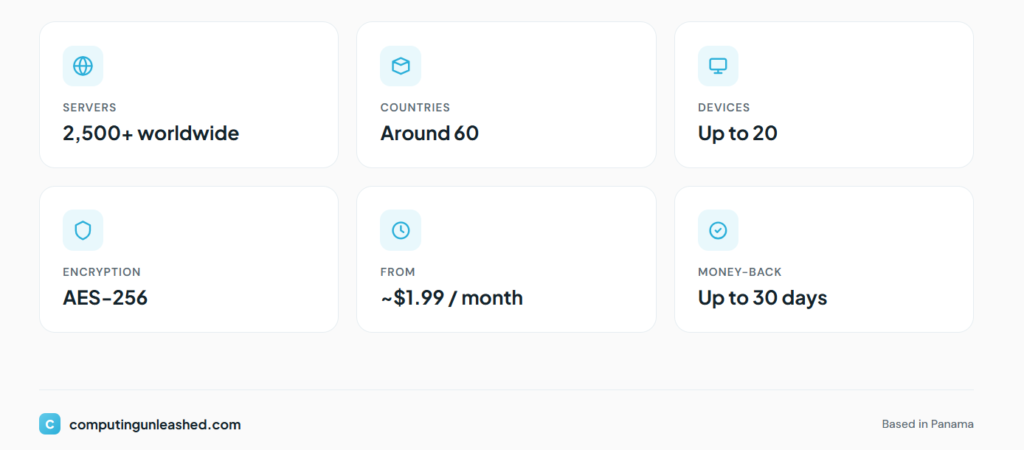
- Security: Strong on paper. AES-256, RAM-only servers, perfect forward secrecy, and a modern protocol lineup. The encryption is not the problem.
- Privacy: Mixed. The Panama base is great, but the lack of a publicized audit and the reported trackers mean you are trusting claims rather than verified proof.
- Streaming: The weakest area. Possible but inconsistent, and unreliable for the toughest services.
- Speed: Fine nearby, frustrating far away.
- Value: Excellent on long-term plans, poor on monthly. This is the heart of VeePN’s appeal.
- Ease of use: Genuinely good. The apps are friendly and the setup is painless.
So is it worth it? For the right person, yes. If you want affordable, competent everyday privacy and torrenting, and you are willing to commit to a long-term plan, VeePN delivers a lot for the money. If you need bulletproof streaming, top speeds, or audited, no-compromise privacy, your money is better spent elsewhere. VeePN is a value play, not a premium one, and judged on that basis it largely succeeds.
Final rating
| Category | Score |
|---|---|
| Security | 8/10 |
| Privacy | 6/10 |
| Streaming | 5/10 |
| Speed | 6/10 |
| Ease of use | 8/10 |
| Value | 9/10 |
| Overall | 7.6/10 (3.8/5) |
Frequently asked questions
Is VeePN safe?
For everyday use, yes. It uses AES-256 encryption, runs RAM-only servers, supports perfect forward secrecy, and is based in privacy-friendly Panama. The caveats are the unaudited no-logs claim and reports of trackers in some app versions, so it is safe for normal privacy but not the top choice for high-stakes anonymity.
Does VeePN work with Netflix?
Sometimes. Some users unblock US Netflix successfully, while others get blocked and have to switch servers to find one that works. It is not reliable enough to count on if Netflix is your main reason for buying.
Is VeePN good for torrenting? Y
Yes. Torrenting is allowed on all servers, the desktop kill switch protects you if the connection drops, and download speeds on nearby servers are solid. It is one of VeePN’s stronger use cases.
Does VeePN keep logs?
VeePN claims a strict no-logs policy and is based in a jurisdiction with no mandatory data retention. However, this claim has not been backed by a widely publicized independent audit, and the privacy policy has been criticized as vague, so you are taking the company at its word.
Can VeePN unblock streaming services?
Partially. It can unblock some services some of the time, often after switching servers. It struggles with aggressive ones like BBC iPlayer. Treat streaming as a bonus, not a guarantee.
How many devices can I use with VeePN?
It depends on your plan: 5 devices on Basic, 10 on Pro, and up to 20 on Max. The higher tiers make it suitable for families and multi-device households.
What protocols does VeePN support?
WireGuard, OpenVPN, and IKEv2. WireGuard is the fastest and best for everyday use, OpenVPN is the reliable fallback, and IKEv2 is great for mobile connections that switch between Wi-Fi and cellular.
How much does VeePN cost?
Monthly plans run roughly $10.99 to $14.99, but long-term plans drop the price dramatically, as low as around $1.67 to $2.49 per month. The value is entirely in committing long term.
Does VeePN have a money-back guarantee?
Yes. Monthly and 1-week plans come with 14 days, while 6-month and longer plans come with 30 days. The refund process can be slow, so contact support early if you want one.
Is VeePN worth it in 2026?
For budget-focused users who want solid everyday privacy and torrenting on a long-term plan, yes. For reliable streaming, top speeds, or audited privacy, a premium provider is a better fit.
