Last Updated on June 22, 2026 by CU Staff
Not change your MAC address. It hides your IP address and encrypts your traffic, but your MAC address stays exactly the same. This trips up a lot of people because both things get lumped under the vague heading of “online privacy,” and they are not the same job. In this post I will explain what a MAC address actually is, why a VPN can’t touch it, what a VPN does protect, and what you should do instead if changing your MAC address is what you really want.
Quick answer: does a VPN change my MAC address?
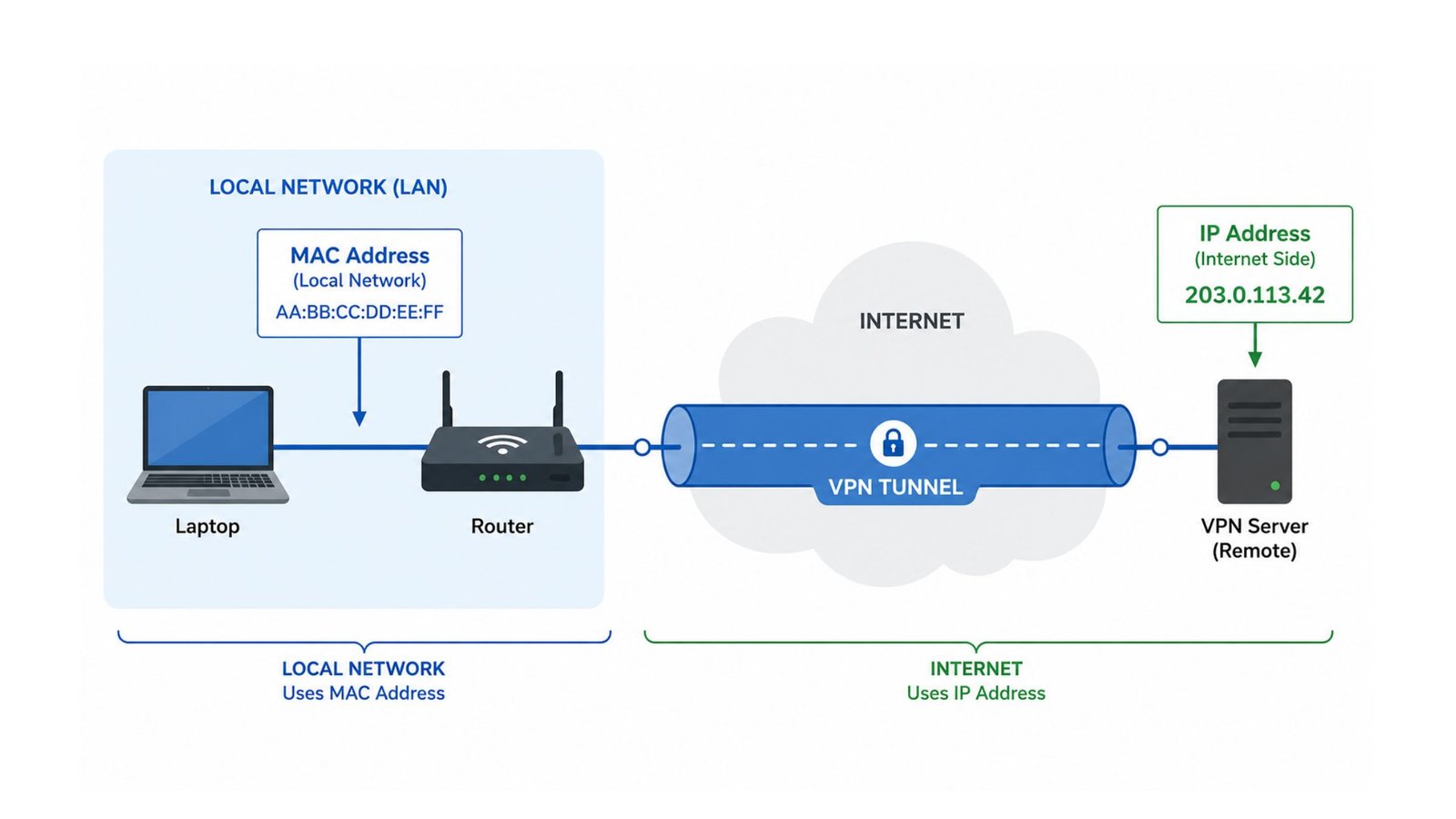
No. A VPN does not change or hide your MAC address. A VPN works at the network layer, where IP addresses live, so it can swap your public IP for the VPN server’s IP. Your MAC address lives one layer below that, on your local network only, and the VPN never touches it. Websites you visit never see your MAC address anyway, so there is nothing for the VPN to hide.
That is the whole answer in 55 words. The rest of this article is the “why,” because once you understand the why, every follow-up question answers itself.
MAC address vs IP address: the part everyone skips
You can’t make sense of this topic without separating two identifiers that people constantly confuse. They sound similar. They do completely different jobs.
A MAC address (Media Access Control address) is a hardware ID. It is baked into your device’s network card by the manufacturer, and it usually looks like 00:1A:2B:3C:4D:5E, six pairs of letters and numbers. Your laptop has one. Your phone has one. Your smart TV has one. Its only job is to identify your device on the local network, the small bubble of gear sitting behind your home or office router.
An IP address is a network ID. It is the label the wider internet uses to send data back to you, and unlike a MAC address it can change. Reconnect to your router, switch networks, or let your ISP rotate its leases, and your IP can be different. Think of the IP address as the mailing address on an envelope and the MAC address as a name tag you only wear inside your own building.
Here is the cleanest way to hold both in your head:
- MAC address: local only, hardware-level, mostly fixed, never leaves your network.
- IP address: global, software-assigned, changeable, travels across the internet.
A VPN operates on the IP side. That single fact decides everything else.
Why a VPN can’t see your MAC address in the first place
Networking is built in layers, and the two that matter here are Layer 2 and Layer 3.
Layer 2 is the data link layer. This is where MAC addresses do their work, moving data between devices on the same local network over Ethernet or Wi-Fi. Your router talks to your laptop using MAC addresses, but that conversation stays inside your four walls.
Layer 3 is the network layer. This is where IP addresses and routers operate, and it is where your traffic gets handed off to the wider internet. A VPN builds its encrypted tunnel here, at Layer 3.
So picture a packet of data leaving your laptop. On its way out, it carries your MAC address while it crosses your local network. The moment it hits your router and gets pushed onto the internet, that MAC address is stripped off and replaced by your public IP. By the time your traffic reaches a VPN server, the MAC address is long gone. The VPN literally never receives it, which means it has nothing to change.
This is why switching VPN servers, reconnecting, or even using a different VPN provider makes zero difference to your MAC address. The VPN sits a layer above the place where MAC addresses exist. (For the technically curious, almost every commercial VPN is a Layer 3 VPN that relays IP packets. Layer 2 VPN technologies like Ethernet bridging do exist, but no consumer VPN service you sign up for works that way.)
Can websites see my MAC address?
No. This is the reassuring part, and it is the reason the original question matters less than people think.
When you load a website, the remote server only sees your public IP address. Your MAC address never makes it past your own router, so a website cannot read it, log it, or track you with it. The places that can see your MAC address are the devices on your own local network: your router, your modem, and anything else connected to the same Wi-Fi. That is it.
So if your worry was “some website out there is tracking me by my MAC address,” you can relax. That is not how it works. The thing websites and advertisers actually use to follow you around is your IP address, browser fingerprint, and cookies, and a VPN helps with the first of those.
What a VPN actually does protect
Since a VPN is the wrong tool for the MAC address job, it is worth being clear about what it genuinely does. A good VPN gives you three real things.
It hides your public IP address, replacing it with the VPN server’s address so websites and your ISP can’t tie your activity to your home connection. It encrypts your traffic, which matters most on public Wi-Fi where someone on the same network could otherwise snoop on what you are doing. And it makes your browsing harder to trace back to you, since your requests appear to come from the VPN server rather than your actual location.
Those are meaningful privacy wins. They just have nothing to do with your hardware MAC address. If you want a fuller picture of how your connection behaves, our guide on how internet speed actually works covers the layer of your connection that a VPN does sit on top of.
How to actually change your MAC address (if you really need to)
Let’s say you have a legitimate reason to change your MAC address. Maybe you want to dodge MAC-based tracking on a public network, or get around a device limit on a hotspot, or test something on your own network. A VPN won’t do it, but a few real methods will.
MAC address spoofing
Spoofing temporarily changes the MAC address your device broadcasts, while leaving the real hardware address untouched. It is the most common approach and it is reversible.
On Windows you can do it through Device Manager: open the properties of your network adapter, go to the Advanced tab, and look for a “Network Address” or “Locally Administered Address” property where you can type a new value. On macOS and Linux it can be done with a terminal command. On phones, MAC randomization (more on that below) often covers the same ground without any manual work.
A spoofed MAC address typically resets to the original when you reboot, unless you set it to persist, so it is low-risk to experiment with.
Built-in MAC randomization
Most modern phones and laptops already do a version of this for you. iPhones, Android devices, and Windows machines can broadcast a randomized MAC address to each Wi-Fi network instead of the real one, specifically to stop networks from tracking your device across locations. Your true hardware MAC stays the same underneath, but the address the network sees changes. On iPhone this lives in the Wi-Fi settings under “Private Wi-Fi Address.” On Android it is usually labeled “Randomized MAC.”
If your only goal was to avoid being tracked by MAC address, turning this on is easier and safer than manual spoofing.
Replacing the network card
The only way to permanently change your physical MAC address is to swap out the network interface card itself, since each card ships with its own unique address. This is overkill for almost everyone and not something I would recommend just for privacy. Spoofing or randomization gives you the same practical result without opening your machine.
Common mistakes to avoid with VPNs and MAC addresses
- Thinking a VPN makes you anonymous on your own network. Your router still sees your real MAC address and local IP. A VPN does nothing about that.
- Assuming MAC address equals identity online. Websites can’t see it. Stop worrying about it leaking to the internet, because it doesn’t.
- Buying a VPN to “hide your MAC.” No VPN can do this. If a product claims it can, that is a red flag about the rest of its marketing.
- Spoofing your MAC and forgetting you did it. It can break network access that relies on MAC filtering, like some office or campus networks. Note your original address first.
- Confusing MAC randomization with a VPN. They solve different problems. Randomization stops local tracking; a VPN hides your public IP. Use both if you want both.
Pro tips for real network privacy
If privacy is the actual goal, stop fixating on the MAC address and stack the right tools instead.
Turn on MAC address randomization on your phone and laptop so public networks can’t profile your device across visits. Use a reputable VPN on untrusted Wi-Fi to encrypt your traffic and mask your public IP. Keep your router firmware updated and use WPA3 encryption if your hardware supports it, since that protects the local network where your MAC address actually lives. And if you are on a shared or public connection, it is worth knowing how to check who else is using your wireless connection, because local snooping is a far more realistic threat than any MAC address leak.
The pattern here is simple: match the tool to the layer. VPN for the public side, randomization and router security for the local side.
Key takeaways
A VPN does not change your MAC address, and it never will, because the MAC address lives on your local network at a layer the VPN doesn’t operate on. The good news is you almost never need to hide your MAC address, since websites can’t see it in the first place. If you genuinely want to change it, MAC spoofing or built-in randomization will do the job, and a VPN remains the right call for hiding your public IP and encrypting your traffic. Use each tool for what it is actually good at and you will be in good shape.
Frequently asked questions
Does a VPN hide my MAC address?
No. A VPN hides your public IP address and encrypts your traffic, but it does not hide or change your MAC address. Your MAC address only exists on your local network and never reaches the websites you visit, so there is nothing for the VPN to hide.
Can a website see my MAC address?
No. Websites only see your public IP address. Your MAC address is stripped off the moment your traffic leaves your router, so it never travels across the internet to any external server.
What is the difference between a MAC address and an IP address?
A MAC address is a fixed hardware ID used only on your local network. An IP address is a changeable software ID used to route data across the internet. A VPN can swap your IP address but cannot touch your MAC address.
How do I change my MAC address if a VPN can’t?
Use MAC address spoofing, which temporarily broadcasts a new address, or turn on the built-in MAC randomization feature on your phone or laptop. Both leave your real hardware address intact and are reversible. Replacing the network card is the only permanent method, and it is rarely necessary.
Do I even need to hide my MAC address?
For most people, no. Since websites can’t see it and it never leaves your local network, it is not a meaningful tracking risk online. MAC randomization is enough if you want to avoid being tracked by local networks like public Wi-Fi hotspots.
Should I use a VPN and MAC randomization together?
If you want both kinds of privacy, yes. MAC randomization stops local networks from profiling your device, while a VPN hides your public IP and encrypts your traffic from your ISP and external observers. They cover different layers and work fine side by side.
